
Tablet display design: waiting-area Kiosk (advertising / health education / queue calling)
Status: implemented (T1–T10, T12). The
tablet/client, the server-side ads/calls module, and the four dash management pages are all landed and verified item by item; T11 (WS broadcasting) was evaluated and not adopted — queue-calling polling was reduced to once per second with a measured on-screen time of ~1.5s, far below the 3s acceptance line, not worth introducing a WebSocket dependency to the server for it.
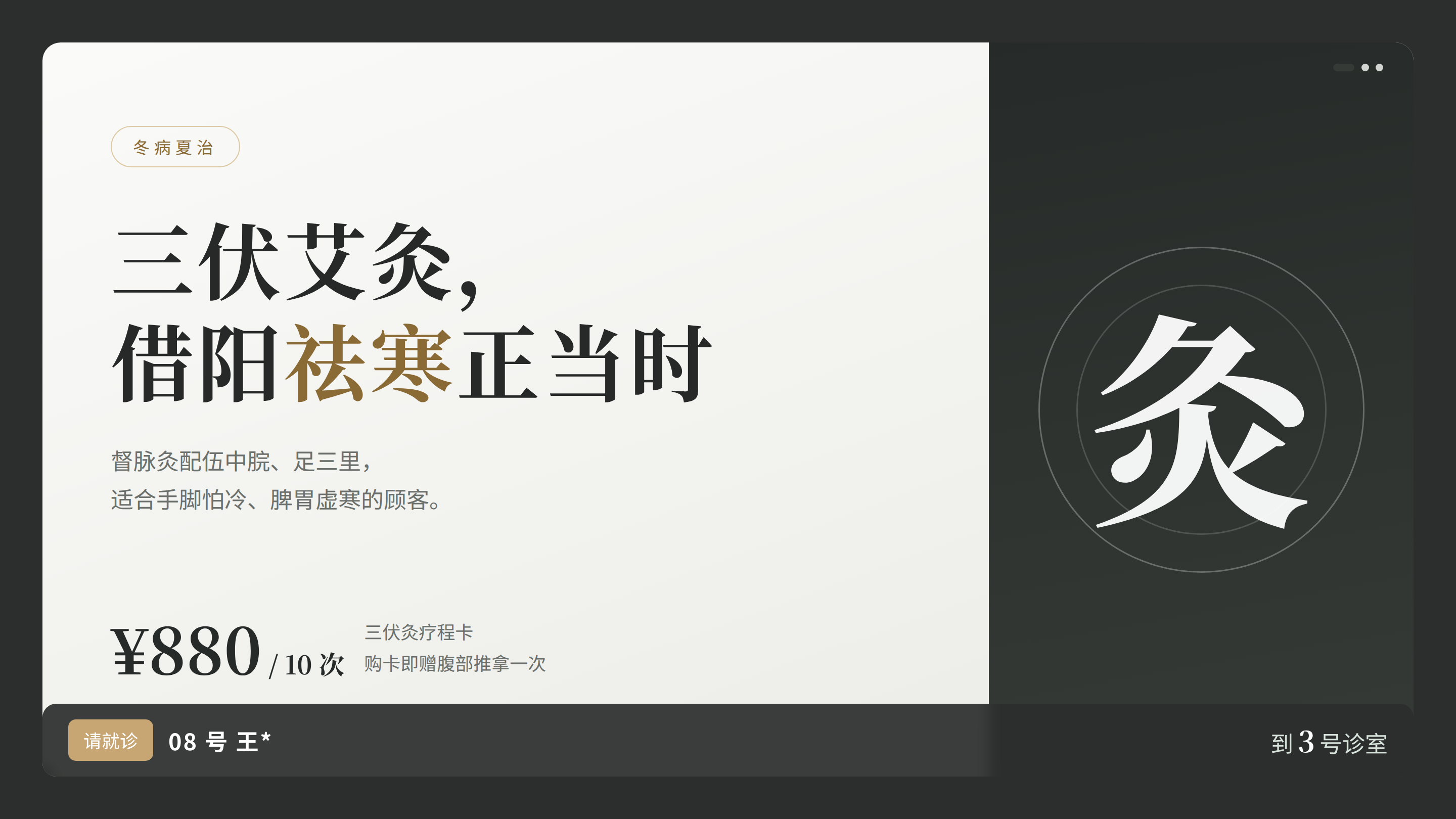
UI prototype (ad carousel + queue calling on screen; design mockup · data is fictional for the demo):
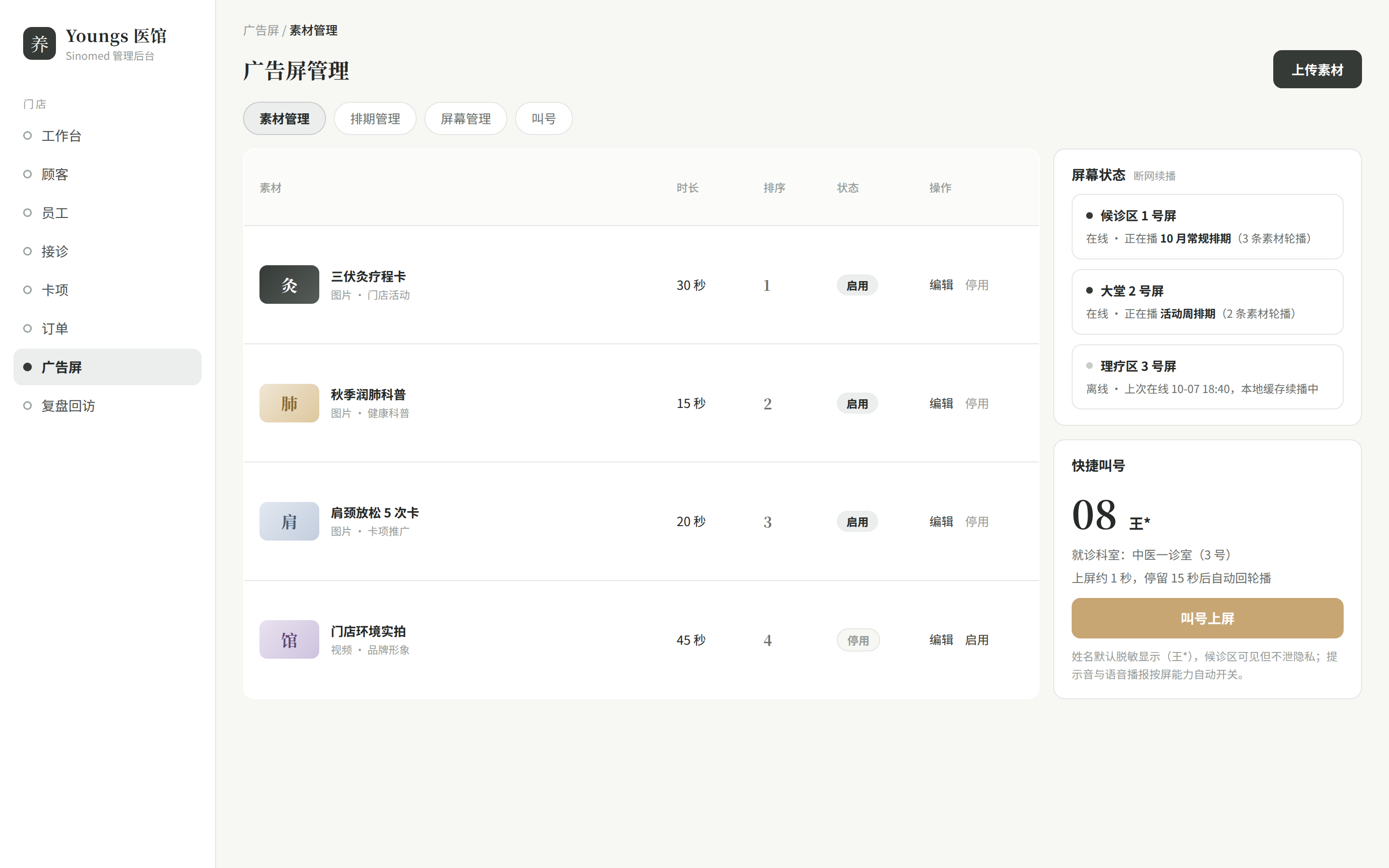
UI prototypes of the admin console companion pages (materials management + screen status + quick queue calling; design mockups):
Positioning and scenarios
tablet/ is a Kiosk fullscreen web page running on the waiting-area tablet (no interaction or minimal interaction), with three kinds of content:
- Ad carousel: store cards and event promotions (images / videos);
- Health education: TCM wellness content materials;
- Queue calling prompts: when the front desk calls a number, the screen switches fullscreen to "room + number" and returns to the carousel after playing.
Material management is not done on the tablet — the admin console (web dash) gains materials / schedule / screen management pages, and the server adds an ads module that delivers everything uniformly.
web dash(素材/排期/屏/叫号管理) ──► server ads/calls 模块(表 + 下发接口)
                                          │
                         tablet/(Kiosk 全屏页)◄── 轮询拉取排期(30s)与叫号(1s)
Data model (server-side new tables)
Designed per the existing JPA conventions (auto-increment id, audit fields create_time/update_time, no foreign key constraints, ddl-auto table creation); all are new tables:
ad_materials — materials
| Field | Type | Meaning |
|---|---|---|
| id | Long | Primary key |
| name | String | Material name (required) |
| kicker | String | Overlay kicker (optional; if all four copy fields are empty it plays as pure material) |
| title | String | Overlay headline (optional) |
| copy | String | Overlay copy subhead (optional) |
| price | String | Price line, free text (optional) |
| type | Integer | 1 image, 2 video |
| url | String | File relative path (written to disk by the server, then statically hosted by Nginx) |
| duration_ms | Integer | Carousel dwell duration (videos can use their actual duration) |
| enabled | Integer | 1 enabled, 0 disabled |
| sort | Integer | Carousel order |
ad_screens — screens (Kiosk registration)
| Field | Type | Meaning |
|---|---|---|
| id | Long | Primary key |
| code | String | Screen identifier (unique, filled in the tablet config) |
| name | String | Name (e.g. 「一楼候诊区」) |
| location | String | Target location (waiting area / clinic room) |
| enabled | Integer | 1 enabled, 0 disabled |
| last_seen_at | Date | Last heartbeat (reported incidentally when the tablet pulls schedules) |
ad_schedules — schedules
| Field | Type | Meaning |
|---|---|---|
| id | Long | Primary key |
| screen_id | Long | Screen id (business foreign key) |
| material_id | Long | Material id (business foreign key) |
| weekdays | String | Effective weekdays (e.g. 1,2,3,4,5, empty = every day) |
| start_time / end_time | String | Effective time window (HH:mm, empty = all day) |
| enabled | Integer | 1 enabled, 0 disabled |
queue_calls — queue call records
Queue calling has two parallel sources (the "automatic queue calling on arrival" of 2026-10-12 is already implemented): the front desk calls numbers manually in the admin console (kept for walk-ins / no-appointment scenarios), and appointment check-in (status 0→1) makes the server automatically write a queue_calls entry (number = that day's check-in sequence zero-padded to two digits, room = treating physician's name + 「诊室」 / 「待分配诊室」 when unassigned, name masked, broadcast to all screens; skipped/cancelled numbers are not called).
| Field | Type | Meaning |
|---|---|---|
| id | Long | Primary key (also serves as the tablet's pull cursor since) |
| screen_id | Long | Target screen (business foreign key; empty = all screens) |
| number | String | Number (e.g. 08) |
| room | String | Room name (e.g. 「第二诊室」) |
| patient_masked | String | Masked name (e.g. 张*, privacy by default) |
| status | Integer | 0 pending call, 1 called |
| called_at | Date | Call time |
API surface (server adds /api/v1/ads, /api/v1/calls)
| Group | Interface | Description |
|---|---|---|
| Materials management | POST/PUT/DELETE /api/v1/ads/materials, GET /api/v1/ads/materials/page | For dash, login required |
| Media upload | POST /api/v1/ads/materials/upload (multipart) | Written to data/ads/, statically hosted by Nginx; the server currently has no file upload code at all; this is a new capability |
| Schedule management | POST/PUT/DELETE /api/v1/ads/schedules, GET …/page | For dash |
| Screen management | POST/PUT/DELETE /api/v1/ads/screens, GET …/page | For dash |
| Delivery | GET /api/v1/ads/playlist?screen={code} | Tablet pull: returns { version, items[] }, where version is a content stamp; the tablet does not re-pull media when it is unchanged; incidentally updates the heartbeat last_seen_at |
| Queue call action | POST /api/v1/calls | Front desk triggers (P0 manual number entry / patient selection) |
| Queue call pull | GET /api/v1/calls/latest?screen={code}&since={id} | Tablet polling, returns new calls after since |
Security boundary (stated plainly): the tablet is an intranet device, and the delivery interfaces are allowed through as read-only + screen code validation (/api/v1/ads/playlist, /api/v1/calls/latest, /media/** are unauthenticated); if exposed to the public internet, add a screen token. Polling cadence: schedules every 30s, queue calls every 1s (indexed queries are cheap; measured queue-call on-screen time ~1.5s); WS broadcasting was evaluated and not adopted — the benefit does not justify the server's new WebSocket dependency and connection management.
Schedule model
The tablet's render sequence = f(screen, current time):
命中的排期 = ad_schedules 中 screen=本屏 ∧ enabled ∧ (weekdays 含今天) ∧ (start_time ≤ now ≤ end_time)
播放序列   = 命中排期关联的启用素材,按 sort 排序
兜底 = 无命中排期时,播放该屏全部启用素材- dash can target by clinic room / waiting area: different
screens get different schedules (e.g. the calling screen only plays health education + queue calls). - Content stamp
version: updated on any material/schedule change (taking the related tables'max(update_time)); the tablet compares it, refreshes the difference and pre-caches new media.
Queue calling linkage
前台(web dash 叫号按钮) → POST /api/v1/calls(写 queue_calls)
tablet 轮询 calls/latest?since=… → 发现新叫号
  → 全屏切换「诊室 + 号码 + 脱敏姓名」,提示音(Web Audio)
  → 停留 N 秒(默认 15s,可配)
  → 自动回轮播;轮询游标推进
Voice broadcast (TTS) is implemented as "toggle by device availability" (T12): the Web Speech API plays 「请 X 号到 Y 诊室就诊」; devices without support or without a Chinese voice engine silently skip it, leaving only the chime.
Offline fault tolerance
- Media pre-caching: the Service Worker / Cache API caches all media of the current
versionlocally; playback continues after the network drops on first load. - Offline behavior: keep looping the cached version; an "offline" status badge appears in the screen corner; after recovery, schedules and the queue-call cursor are pulled again automatically.
- Stated boundary: during an outage queue calls are unreachable (call events come from the server); missed calls are not replayed after recovery (records are taken from the latest
since).
Directory layout
tablet/                     # monorepo 目录(与 server/ web/ app/ 平级)
├── src/
│   ├── player/             # Carousel 轮播引擎 + CallOverlay 叫号提示层 + chime/speech 提示音与播报
│   ├── net/                # 排期/叫号拉取、version 比对、心跳、媒体预缓存调用
│   └── App.tsx             # 屏标识读取、Wake Lock、全屏、离线角标
├── public/sw.js            # Service Worker:/media 缓存优先 + 后台刷新(媒体预缓存)
├── index.html              # 全屏、禁止休眠(Wake Lock API 尽力而为)
├── package.json            # name: sinomed-tablet(Vite + React + TS,Node.js 24 / pnpm)
└── .nvmrc

web/src/pages/Ads/          # dash:素材管理 / 排期管理 / 屏管理 / 叫号操作(Calls)
server/src/main/java/com/sinomed/
├── entity/                 # AdMaterialEntity / AdScreenEntity / AdScheduleEntity / QueueCallEntity
├── controller/             # AdsController / CallController
└── service / repository    # 对应分层
Deployment layout: Nginx adds two static hosting segments — /tablet/ (tablet/dist) and /media/ (data/ads/); the tablet browser opens https://…/tablet/?screen=xxx and is set as the fullscreen start page.
todo atomic items (all accepted)
P0
| # | Item | Acceptance | Status |
|---|---|---|---|
| T1 | server ads module: three-table entities + materials/schedule/screen CRUD interfaces + multipart upload to disk | All management interfaces callable via Knife4j | ✅ All interfaces verified with curl |
| T2 | Delivery interfaces: playlist (with version) and heartbeat | curl gets the correct sequence and content stamp per screen | ✅ Including wrong-screen errors and the no-schedule fallback |
| T3 | tablet/ scaffolding + carousel engine (images/videos, duration, order) | Browser fullscreen carousel of dash-configured materials | ✅ Headless two-material rotation verified |
| T4 | dash materials management page (upload / enable-disable / sort / duration) | The page covers the full material lifecycle | ✅ Verified in a browser |
| T5 | dash schedule + screen management pages (time windows, weekdays, per-screen targeting) | Two screens with different schedules each take effect | ✅ PAD-02 / PAD-TEST dual-screen verified |
| T6 | tablet pull and version comparison, media pre-caching | Auto-updates within 30s of a content change | ✅ Image swap on screen in 27s |
| T7 | Offline fault tolerance: offline continued playback + offline badge + recovery re-pull | Unplug the network and playback continues, plug it back to recover | ✅ Badge switches instantly, offline continued playback |
P1
| # | Item | Description | Status |
|---|---|---|---|
| T8 | server queue-calling module: queue_calls table + POST /api/v1/calls + calls/latest | The minimal queue-calling loop interfaces work | ✅ curl targeted/broadcast/cursor all pass |
| T9 | dash queue-calling entry (front desk button: pick room / enter number) | One-tap queue calling from the front desk | ✅ /ads/calls verified in a browser |
| T10 | tablet queue-call prompt page (fullscreen switch, chime, auto-return to carousel after N seconds) | Call events on screen within 3s | ✅ Measured 1.5s on screen |
| T11 | WS broadcasting replacing queue-call polling (optional) | Further reduce on-screen latency | ⛔ Not adopted after evaluation (1s polling already meets the bar; no WS dependency introduced) |
| T12 | Voice broadcast (Web Speech API, toggle by device availability) | Optional enhancement | ✅ Code path verified; audible effect subject to real devices |