
Customer service selection design: in-store Kiosk (browse / select cards / place order)
Status: implemented (K1–K6). The
kiosk/client (browse grid / place order / success receipt / idle basket clearing), the server-side kiosk interfaces and order management are all landed and verified item by item; together with the waiting-area display screen (tablet display) they are two devices and two projects — the display screen only plays, this machine is the customer's self-service entry.
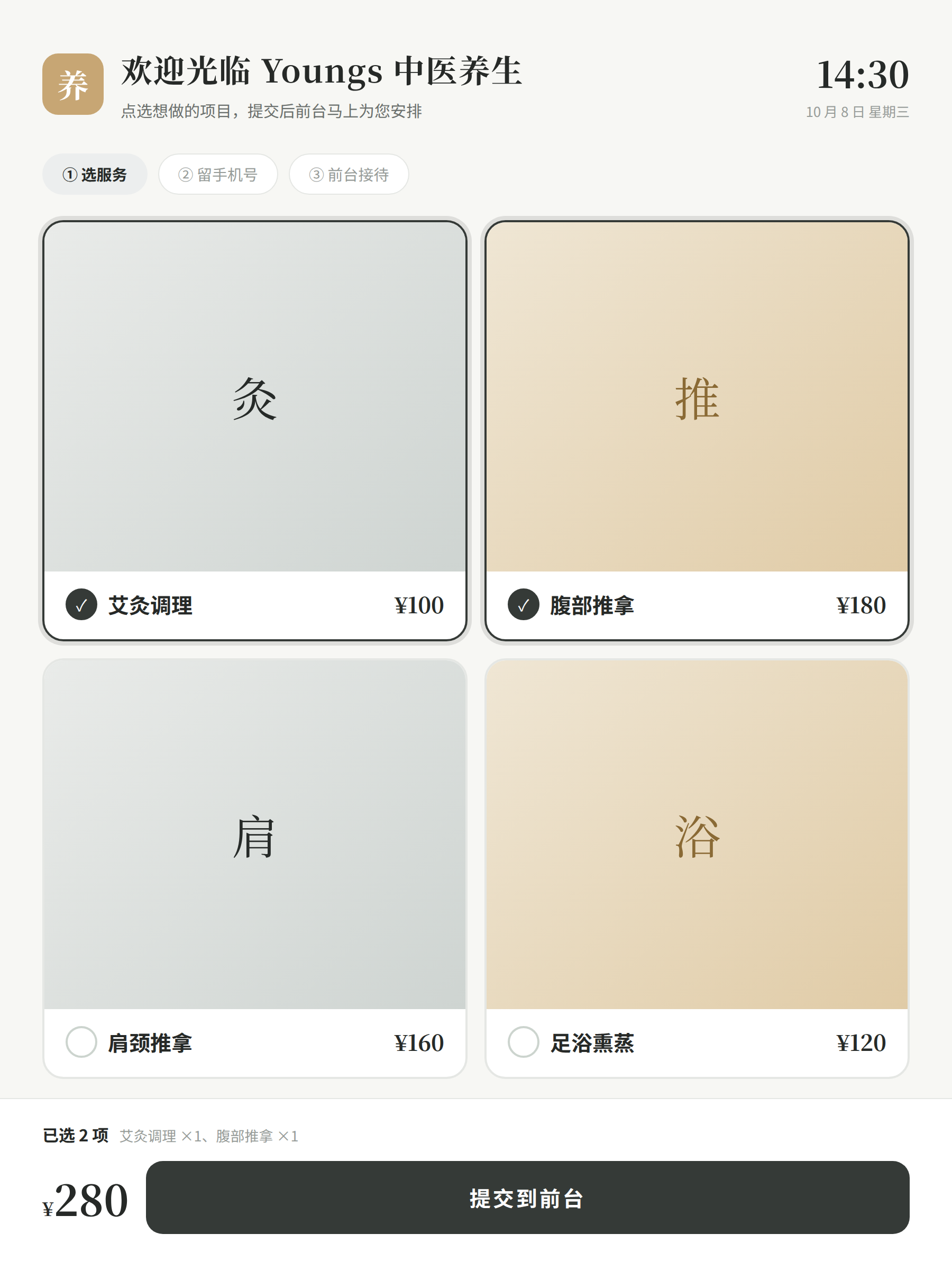
UI prototype (service selection and order page; design mockup · data is fictional for the demo):
Positioning and scenarios
kiosk/ is a customer self-service iPad web page placed at the front desk / lobby: arriving customers browse services on the big screen, check the cards they want themselves, leave a phone number and submit, and the front desk accepts the order in the admin console. Three steps:
- Browse: a large-text grid shows enabled cards (cover + name + price), touch-friendly;
- Select services: tap to add to the shopping basket, multi-select with add/remove;
- Place order: fill in a phone number (name optional) and submit; the screen shows the order number and total; the front desk sees the new order in the admin console's "order management" and checks the patient in.
No payment (no collection code at all; placing an order means arriving at the store, not yet arrived); no member pricing/discount calculation (order amount follows the card price snapshot at order time).
顾客(kiosk/ 大屏点选) ──► server kiosk 接口(浏览只读 + 下单)
                                │
                  前台(web dash 订单管理)◄── 新单状态流转(接单 → 完成 / 取消)
Data model (reuse existing tables, add fields)
items — three new fields for cards
The current card table only has name / price / description; Kiosk browsing needs display and publish control, so add:
| Field | Type | Meaning |
|---|---|---|
| enabled | Integer | 1 published, 0 unpublished (the Kiosk only shows published items; existing rows default to 1) |
| cover | String | Cover image relative url (optional; reuses the existing media upload and /media hosting) |
| sort | Integer | Display order, smaller first |
ddl-auto: update adds the columns automatically without affecting existing data. The admin console card page (already exists) gains editing for these three fields.
orders — status semantics finalized
The table already exists (user_id / item_id / staff_id / status / price) and all previous interfaces were empty shells. Now the statuses are finalized and hard-coded:
| status | Meaning |
|---|---|
| 0 | Ordered (initial state after Kiosk submission) |
| 1 | Confirmed (front desk checking in) |
| 2 | Completed |
| 9 | Cancelled |
user_idstores the patient id (customerstable, business foreign key);item_idstores the card id;staff_idcan be filled when accepting the order (empty initially for Kiosk orders);priceis the card price snapshot at order time (Integer, in cents to match the card table — the card price is currently stored as an integer in yuan, followed as-is);- one card per order (multi-select = multiple orders, the same submission shares one patient); no shopping-cart table.
Patient association
customers.phone is unique. Kiosk orders look up the patient by phone number and create a record if none exists: name takes the name input (defaults to 「到店客人」 when empty), phone is required and must match the 11-digit mobile number format.
API surface (server adds /api/v1/kiosk, unauthenticated)
| Method | Path | Description |
|---|---|---|
| GET | /api/v1/kiosk/items | Kiosk browsing: cards with enabled=1 ordered by sort,name ascending, returning id / name / price / cover / description (no audit fields) |
| POST | /api/v1/kiosk/orders | Kiosk order placement: { phone, name?, itemIds: [卡项id…] }; validates phone format and that cards exist and are published; finds/creates the patient by phone number; writes one order per item (status=0, price=current card price); returns { customerId, customerName, orders: [{ id, itemId, itemName, price }], totalFee } |
Unauthenticated boundary (stated plainly): the Kiosk is an intranet device and the browse interface is purely read-only; the order interface is the only write entry, with writes limited to "one patient record (idempotent by phone number) + N status=0 orders", exposing no query/delete capability. If exposed to the public internet, a verification code or screen token must be added.
Admin console order interfaces: reuse OrderService (save/findById already exist), add list queries and status flow, under the login-required /api/v1/order group:
| Method | Path | Description |
|---|---|---|
| GET | /api/v1/order/page | Pagination (current, pageSize, optional status), joins in patient name and card name |
| PUT | /api/v1/order/status | { id, status }, only allows the forward flow 0→1→2 and cancellation 0/1→9 |
| DELETE | /api/v1/order/{id} | Reuses the existing delete (only 9 cancelled can be deleted) |
The existing empty-shell interfaces POST/PUT /api/v1/order/, GET /api/v1/order/{id} etc. are all replaced with real implementations (OrderView fields aligned with the entity: customerId/itemId/staffId/status/price, dropping extOrderId/payType/payment which do not exist in the entity).
Phone card lookup (mini program "My Cards", 2026-10-14 ruling)
Privacy red line: no bare phone-number card lookup — refused without identity binding. There are two identity-binding paths, selected by the backend config sinomed.phone-lookup.mode three-state switch (env PHONE_LOOKUP_MODE), default off (disabled):
| mode | Behavior |
|---|---|
off | Default. card-lookup, sms-code, openid-session, openid-bind, my-appointments and appointment-cancel are all refused with 400; the mini program page shows 「在线查卡已关闭 / 在线自助查询已关闭,请到店前台或致电门店查询」 |
openid_only | Login state exchanges for an openid: the mini program's wx.login → the server's POST /api/v1/kiosk/openid-session exchanges via WeChat jscode2session for an openid (requires WECHAT_APP_ID/WECHAT_APP_SECRET, refused with 400 and a clear error when unconfigured), then looks up the bound patient by customers.openid; missing openid / unbound are both refused, no fallback to phone number; in this mode sms-code only serves self-binding (code sending is allowed, card lookup still goes through openid only); my-appointments / appointment-cancel are refused with 400 in this mode |
sms_verified | Phone number + SMS verification code two-factor: first sms-code sends a code, then cards are looked up with smsCode (card-lookup), your own not-yet-arrived appointments are looked up (my-appointments, cross-device), or your own not-yet-arrived appointment is cancelled (appointment-cancel, decided on the user's behalf 2026-10-16); the code is valid for 5 minutes and one-time; wrong/expired/used codes are all refused; wrong attempts are counted and 5 consecutive wrong attempts burn the code (used=1, must re-issue); openid-session / openid-bind are refused with 400 in this mode |
| Method | Path | Description |
|---|---|---|
| POST | /api/v1/kiosk/sms-code | { phone }; shared by sms_verified card lookup and openid_only binding (refused when off); sends a 6-digit code stored in sms_codes (valid 5 minutes, one-time). This system has no SMS gateway, so code sending is a server stub: the code only lands in the database and logs (SMS_CODE_DEMO phone=… code=…), never leaked externally |
| POST | /api/v1/kiosk/card-lookup | { phone?, openid?, smsCode? }; goes the openid or two-factor path per mode; on a patient hit returns { customerId, customerName, cards: [{ cardId, itemId, itemName, totalTimes, remainingTimes, status, validUntil }] } (newest card first; disabled and expired cards are labeled by the frontend); on a miss/refusal no cards are returned at all |
| POST | /api/v1/kiosk/openid-bind | { openid, phone, smsCode }; dedicated to openid_only mode (see below) |
openid self-binding (2026-10-15 decided on the user's behalf, the user can overturn): the binding path was approved as mini program self-service — openid-bind uses a one-time SMS verification code to prove the phone number, then binds the login openid to that phone number's patient record, no desktop and no front desk involved; it shares the same code channel and audit policy as sms_verified card lookup. Re-binding to the same record is idempotent success; an openid already bound to another record is refused with 400 (no silent rebinding; the front desk must handle it). Previously customers.openid could only be written directly to the database with no registration entry; this is the only registration entry. Activation still lacks WeChat-side credentials (a formal appid + AppSecret, same as the openid-session "build first, activate later" precedent).
Audit: every attempt (success and refusal) writes one card_lookup_logs entry — whose cards were looked up (phone / customer_id), who looked them up (operator: openid path = openid, SMS path = phone number, binding path = openid), what mode (mode), the result (result: ok / disabled / missing_openid / no_binding / missing_code / bad_code / expired_code / used_code / no_customer / bind_ok / bind_conflict / missing_appointment / not_owner / not_cancelable / cancel_ok), and the time (create_time). All paths follow the same policy, and refusals in off mode leave a trace too.
Self-service appointment cancellation (decided on the user's behalf 2026-10-16, the user can overturn): app-booking.md ruling 2 (2026-10-10) decided against patient-side cancellation on the premise that "cancellation verifies no identity, so malicious cancellation of other people's bookings cannot be stopped"; that premise lapsed once phone-number + one-time-code two-factor verification and openid binding landed on 2026-10-14/15, so patient-side cancellation is restored — POST /api/v1/kiosk/appointment-cancel ({ phone, smsCode, appointmentId }) verifies identity and then allows cancelling only the caller's own status=0 not-yet-expired appointment (0→9); not the owner / already received / skipped / already cancelled / already expired / unknown appointments are all refused with 400 (no silent paths); after cancellation the slot is released per the "one booking per slot" rule and the same-day frequency cap lifts accordingly (the same status IN (0,1) counting as ensureSlotFree); it shares the one-time code channel with my-appointments (a code already spent on lookup must be re-issued for cancellation) and the same audit policy. Admin-console cancellation (0→9) remains available in parallel.
Mini program side (app/src/pages/card): a phone number + verification code form; the server's 400 errorMessage is passed through as-is; on a hit it lists held cards and remaining visits. The weapp login exchanges for an openid (kept in memory only, never persisted), and the openid can be sent along to look up cards; when nothing is bound, entering a phone number + code and tapping 「绑定微信」 goes through self-binding (after a successful binding it immediately looks up the cards once by openid); H5 has no wx.login and uses only the SMS path.
Interaction flow
Kiosk 首页(卡项网格,30s 无操作自动清篮回首页)
  → 点选卡项 → 底部购物篮(数量合并、可删)
  → 「去下单」→ 手机号 + 称呼(可选)→ 提交
  → 成功页(单号列表 + 合计金额)→ 10s 自动回首页

前台 dash「订单管理」:新单列表(状态角标)
  → 接单(0→1)→ 服务完成(1→2);未接待可取消(→9)
Directory layout
kiosk/                      # monorepo 新增目录(与 tablet/ 平级,同一套 Vite + React + TS 约定)
├── src/
│   ├── net/api.ts          # items 拉取与下单提交
│   ├── menu/               # 卡项网格与购物篮
│   └── App.tsx             # 首页 / 下单 / 成功三态切换、空闲超时回首页
├── index.html              # 触摸大字布局基准(768–1080 宽竖屏为主)
├── package.json            # name: sinomed-kiosk(Node.js 24 / pnpm)
└── .nvmrc

web/src/pages/Order/        # dash:订单管理(替换现存的顾客列表复制品页面)
server/ …/controller/KioskController.java、OrderController.java(真实实现)
Deployment layout: Nginx adds /kiosk/ (kiosk/dist); card covers reuse the /media/ hosting, no new static segment needed.
todo atomic items
| # | Item | Acceptance | Status |
|---|---|---|---|
| K1 | items gains the three fields enabled / cover / sort and exposes them to the VO; the dash card page gains editing | dash can publish/unpublish, upload covers, sort | ✅ Existing rows default to published, the three form fields verified in a browser |
| K2 | server KioskController: GET /kiosk/items + POST /kiosk/orders (unauthenticated, idempotent patient creation by phone) | curl browse read-only, order placement persists, duplicate phone numbers do not duplicate records | ✅ Unpublished items excluded, two-order total and same-number same-patient verified with curl |
| K3 | dash order management page: paginated list (joining patient/card names) + status flow, replacing the empty-shell OrderController | Orders placed from the kiosk are visible in dash and can be accepted/completed/cancelled | ✅ 7 curl cases + browser accept-flow verification |
| K4 | kiosk/ scaffolding + card grid browse page | Opening in a browser shows the published cards as a large-text grid | ✅ Portrait verified: 2 published items, unpublished excluded, tap-to-summarize |
| K5 | Kiosk shopping basket + order placement + success receipt + idle return home | Full touch flow works, a second order with the same phone number goes to the same patient | ✅ Phone validation/receipt/10s auto-return/30s basket clearing, both orders share the same customerId |
| K6 | End-to-end acceptance + doc sync (data-model / api / deploy / index) | The design doc updated to implemented, docs build passes | ✅ The four doc sets synced, docs build passes |