
Desktop design: front desk / doctor workstation (Tauri 2 thin shell)
Status: implemented (P0 D1–D5, P1 D6–D10 all complete). The
desktop/Tauri 2 thin shell, print templates and print bridge, scan input, CI dual-platform installers, updater and nightly release pipeline, single-instance/autostart/auto-restart-on-crash, template versioning, ESC/POS direct printing, scanner serial mode, and read-only peripheral status query are all landed and verified item by item. Thedesktop/client, the waiting-area display screen (tablet display), and the customer self-service Kiosk (customer service selection) are three devices and three projects.
UI prototype (treatment workbench inside the shell; design mockup · data is fictional for the demo):
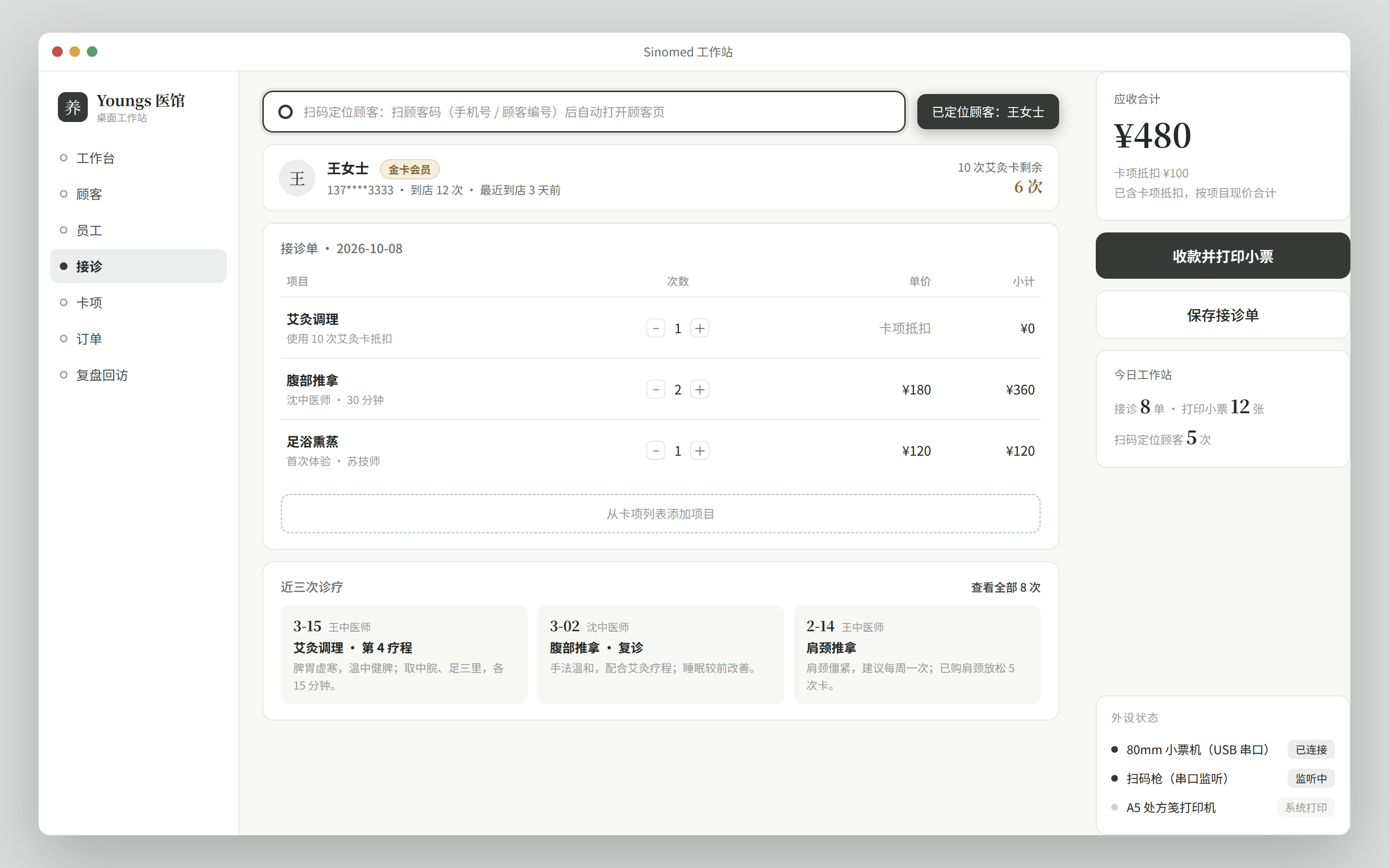
Positioning and scenarios
The desktop version targets the front desk and doctor workstation scenario, primarily Windows:
| Scenario | Current dependency | Desktop enhancement |
|---|---|---|
| Patient record creation / treatment entry | Admin console (web) browser page | Fixed-window entry, free of browser environment differences |
| Printing prescription notes / treatment plans | None (no printing in the source code) | Tauri peripheral bridge to the printer (new design in this doc) |
| Scanning to locate a patient | None (no scanning in the source code) | USB scanner input (new design in this doc) |
| Daily upgrades | Manual browser/deployment updates | Automatic update channel (see below) |
Principle: all business logic lives on the server. The desktop version adds no business logic; the admin console pages run unchanged inside the shell; business iterations only ship server/ and web/, and the desktop shell only ships a new version when peripherals or packaging change (zero business upgrades on the endpoint).
Selection: Tauri 2 thin shell wrapping the existing web
Reasons for choosing Tauri 2 (based on this repo's reality):
- The business is already written once: the admin console (web) already covers every page; a second UI for the desktop version would mean double maintenance. The thin-shell approach directly loads the deployed web address with zero business code.
- System WebView2: compared with embedding a full browser engine, the installer size and memory footprint are markedly smaller; Windows 10/11 ships the WebView2 runtime.
- Peripheral bridge: local peripheral capabilities such as printing and scanning go through Rust-side commands (
invoke); the HTTP surface is unchanged and the server needs no extra interfaces for peripherals. - Official auto-update plugin:
tauri-plugin-updaterprovides a signature-verified update channel, which fits this repo's Release policy.
Architecture
┌─ 工作站(Windows) ────────────────────────────┐
│  desktop/(Tauri 2 薄壳)                       │
│  ├─ 主窗口:加载远程 web 地址(如 https://…/)  │
│  ├─ 外设桥(Rust commands):打印 / 扫码        │
│  └─ 本地:config.json + 打印模板缓存 + 更新器   │
└──────────────┬─────────────────────────────────┘
               │ HTTPS(现有 /api/v1 全量复用)
┌──────────────┴─────────────────────────────────┐
│  server/(业务中枢,不感知客户端形态)           │
│  web/(同一套页面,浏览器 / 壳内皆可运行)       │
└────────────────────────────────────────────────┘- The server has zero new tables; business interfaces are fully equivalent to admin console browser access; template delivery is the only addition (P1 D7, unauthenticated read-only).
- The peripheral bridge goes through Tauri
invoke(in-process calls) and does not enter the HTTP surface; web pages detect the shell environment viawindow.__TAURI__and automatically degrade to normal printing / manual input in a browser.
Peripheral list and plugin slots
| Peripheral | Purpose | P0 approach | Plugin slot |
|---|---|---|---|
| A4/A5 printer | Prescription notes, treatment plan sheets | Windows driver mode: HTML template + @page pagination, webview printing (window.print() targeting a print iframe) | No plugin needed; P1 can switch to Rust-side silent printing |
| 58/80mm thermal receipt printer | Registration receipts, order receipts | Same as above (once the Windows driver is installed it is just a system printer) | ✅ ESC/POS direct printing implemented (print_escpos Rust command, GBK direct send, see D8) |
| USB scanner | Scan a patient code to locate record creation / treatment | Keyboard emulation (HID) mode: just focus an input box to receive codes, terminated by Enter; the web side handles focus management and auto-submit | ✅ HID (D3) + serial mode both implemented (scanner_start/scanner_stop Rust command, see D9) |
Print templates and offline caching: prescription note / receipt templates are HTML files, bundled with the installer and cached to the local app data directory (templates/); the template shell can still open for printing when offline. From P1 the templates are versioned: the server adds an unauthenticated template interface (GET /api/v1/print/templates, blank layouts without business data); the built-in layouts are the fallback and can be overridden by same-named server templates (just drop same-named files into the data/printtemplates/ directory; PRINT_TEMPLATES_DIR is configurable), and the shell incrementally pulls by version (content digest) at startup and before each print — template updates only touch the server, no shell release. Note the boundary: the business data inside templates comes from server interfaces; a fully offline treatment session is out of scope for this design.
Boundary of scan-to-register: appointment registration is already implemented (appointments table + /api/v1/appointment, admin console /appointment/* including the scheduling grid, see the feature list). P0's "scan" = scan a patient code → call existing interfaces such as GET /api/v1/customer/phone/{phone} to locate the patient and enter record creation / treatment; the full registration-and-calling loop is in the tablet display design's minimal queue-calling interface.
Packaging and auto-update
- Packaging: the Tauri bundler produces an NSIS installer (Windows x64); artifacts are uploaded with CI.
- Update policy: follows the nightly rolling Release policy (referencing wingman's
releases/tag/nightlyrolling pre-release pattern): CI overwrites-publishes thenightlypre-release and uploads the installer pluslatest.json(the updater manifest, with signature); formal releases are tagged separately asvX.Y.Z. The release job is manually triggered (workflow_dispatch) — per the repo's iron rule, the push chain never auto-tags/releases; for the first release, just run Desktop Build → nightly Release once in Actions. - Update channel:
tauri-plugin-updaterfetches the manifest fromconfig.json'supdate_channel5 seconds after startup (nightly →releases/download/nightly/latest.json, stable →releases/latest/download/latest.json); when a new version is found it prompts for confirmation, then downloads, installs, and restarts to take effect; with no Release / offline it only logs and never disturbs usage. Signing uses a minisign key: the private key lives in the repo secretTAURI_SIGNING_PRIVATE_KEY(empty passphrase), the public key intauri.conf.json.
Data model
Server: zero new tables. All desktop business data reuses existing tables (customers / treats / items / reviews, see the data model).
Local (workstation) data is only three kinds:
| Location | Content |
|---|---|
config.json | Server address, window size, default printer, update channel, autostart on boot, scanner serial port (scanner_port, empty = disabled) |
templates/ | Print template HTML cache (built-in fallback + server template interface overriding by version, D7 implemented) |
| updater state | Managed by tauri-plugin-updater itself (download cache and version records) |
API surface
- Business: full reuse of the existing
/api/v1interfaces (same as the admin console, see the REST API list); nothing new. - Template delivery (P1 D7 addition):
GET /api/v1/print/templates, unauthenticated read-only; details in "Print templates and offline caching" above. - Local commands (Tauri
invoke, not HTTP):print_html(template, data)(P0),print_escpos(port, data, columns?, baud?)(P1 D8, ESC/POS byte stream written straight to the serial port),set_autostart(enabled)(P1 D6),scanner_start(port, baud?)/scanner_stop()(P1 D9, serial scanner read thread, broadcasts ascanner-codeevent on receipt),peripheral_status()(P1 D10, read-only peripheral status query, does not modify peripherals); whenscanner_portis configured, listening starts automatically at startup, and the page side subscribes via__TAURI__.event.listen(for remote pages, thescanner-remotecapability allowscore:event:defaultevent listening + the read-onlyallow-peripheral-statusquery, while commands that modify peripherals or config such asprint_/scanner_/set_remain disallowed). ACL policy: once the app defines an ACL manifest (src-tauri/permissions/commands.toml), local pages go from "implicitly allowed" to "explicitly allowed" for custom commands —capabilities/default.jsonmust reference the manifest'sdefaultset and allow each command the bootstrap page uses one by one; a manifest/capability mismatch causes local page calls to be rejected; permission identifiers are validated atcargo buildtime, so a typo fails the build directly.
Directory layout
desktop/                    # monorepo 新增目录(与 server/ web/ app/ 平级)
├── src-tauri/
│   ├── src/main.rs         # 薄壳入口:创建窗口、加载远程 URL、注册 commands
│   ├── src/commands/       # print.rs(P0)、scanner.rs(P1)
│   ├── tauri.conf.json     # 窗口 / 打包(NSIS)/ updater 配置
│   ├── icons/              # 应用图标(取自 docs/public/logo.svg 转制,不改原形)
│   └── Cargo.toml
├── ui/                     # 引导页静态资源:服务端地址配置、诊断信息(主窗口默认直接加载远程地址)
├── package.json            # name: sinomed-desktop(Node.js 24 / pnpm,与全仓一致)
└── .nvmrc
CI layout: .github/workflows/desktop.yml (build the NSIS package → overwrite-publish the nightly Release); the deployment target machine needs no resident components.
todo atomic items
P0
| # | Item | Acceptance | Status |
|---|---|---|---|
| D1 | desktop/ Tauri 2 scaffolding: window loads the remote web address, address configurable (config.json / launch args) | Opening the shell on this machine shows the admin console login page and login works | ✅ Real machine under Xvfb: logged in to the dashboard, falls back to the bootstrap page when unconfigured, "save and open" writes to disk and navigates; --server-url arg covered by unit tests |
| D2 | Prescription note / receipt HTML templates + webview-driven printing (@page pagination, printer selection) | Print an A5 prescription note and an 80mm receipt on Windows | ✅ 8 unit tests for the template engine, sample sheets written to disk and the system print dialog invoked, template visuals checked in chromium; paper output pending real Windows testing (CI artifact); the print entry inside admin console business pages is not wired (remote page IPC is limited; for now the bootstrap page's self-check sample covers it) |
| D3 | Scanner keyboard-emulation integration: web-side scan input box focus management, Enter auto-locates the patient | Within 2 seconds of scanning, the corresponding patient page opens | ✅ Customer query page has a scan input: phone number 201ms / ID number 287ms to the patient page (Playwright keyboard fast-type emulation, same protocol as a real HID gun); unknown numbers/invalid codes flagged in place |
| D4 | NSIS packaging script + desktop.yml CI build artifact | CI produces an installable NSIS package | ✅ Desktop Build green: windows-nsis + linux-deb dual artifacts (the same command locally verified the deb at 2.8MiB) |
| D5 | nightly rolling Release workflow (overwrite-publish the nightly tag + latest.json) + tauri-plugin-updater integration | The shell receives an update prompt and upgrades successfully | ✅ Update check wiring verified with graceful 404 degradation; the release job is manually triggered (repo policy), the upgrade loop pending real Windows testing after the first release |
P1
| # | Item | Description | Status |
|---|---|---|---|
| D6 | Single-instance lock, autostart on boot, auto-restart after crash | Unattended workstation operation | ✅ Single instance (dbus name lock, second instance yields and focuses, verified); watchdog parent process --supervised dispatch: kill -9 on the child restarts it within 3 seconds, 60-second 6-stop budget verified, TERM on the parent exits the whole group; autostart is config-driven and converges (~/.config/autostart entry creation/removal verified, the bootstrap page toggle takes effect immediately) |
| D7 | Print template versioning: server template interface + local cache override | Template updates ship no shell release | ✅ Server GET /api/v1/print/templates (unauthenticated, two-template whitelist, SHA-256 content digest version; same-named files in data/printtemplates/ override the built-in, directory override → version drift verified with curl); the shell preheats at startup and incrementally pulls by version before each print into the templates/ cache, printing goes "cache first, built-in fallback" (full chain on a real Xvfb machine: write config while running → click print self-check → log 模板缓存已更新至 ce4be162… → the print temp file contains the override marker instead of the built-in content); 3 server-side + 3 shell-side unit tests covering parsing, filtering, cache-first |
| D8 | ESC/POS direct printing (Rust command, USB/serial) | Driver-free receipt printer scenarios | ✅ print_escpos(port, data, columns?, baud?): receipt data encoded as an ESC/POS byte stream written straight to the serialport serial port (init / doubled-width store name / detail lines / bold total / feed and cut, Chinese sent as GBK directly, full-width counted as 2 columns for width alignment), driver-free with no print dialog; bootstrap page serial self-check (port input + send on click); socat pseudo-terminal verified: ui writes /tmp/escpos-a → the peer receives all 294 bytes (starting with ESC@, GBK「合计/店名」in the stream, ending with GS V 1 cut), bad port shows a red error, verified; 4 encoder unit tests (control commands / GBK / padding by column width / empty data doesn't panic), 18 cargo tests all green |
| D9 | Scanner serial mode (serial port plugin slot) | Fallback when HID emulation is unavailable | ✅ The shell holds a read thread receiving codes by line (100ms timeout polling, stoppable, \n/\r splits lines, partial lines continued), broadcasts a scanner-code event on receipt, the page side subscribes and goes through the existing locate flow, no invoke permission needed; configuring scanner_port starts listening automatically at startup, and the scanner_start/scanner_stop commands serve the bootstrap page self-check and port switching; remote pages via the scanner-remote capability only allow core:event:default (listening only, no business commands); the ScannerInput component subscribes to scanner-code (auto-degrades when there is no __TAURI__ in the browser). Verified with a socat pseudo-terminal pair: ① the bootstrap page fills /tmp/scan-a and clicks listen test, the peer writes 13900002222\n → the page echoes in green "收到扫码:13900002222"; ② production path: configure server_url + scanner_port and listening starts automatically at startup (fd verified occupying the pts), then write the same code value into the remotely loaded admin console customer query page → it auto-jumps to customer/update?customerId=1 (full chain of capability-allowed remote page event subscription + locate navigation); 3 line-splitting unit tests, 21 cargo tests all green |
| D10 | Peripheral status bar: shell-side read-only status query command | The treatment page's peripheral status bar shows real connection state (the prototype has no hard-coded copy) | ✅ New peripheral_status() read-only query command returning all three peripheral states at once — scanner from the read thread's runtime (ScannerState.runtime: port/listening state/last error; read_loop updates at four points — open success, open failure, read failure, normal stop — and status determination is error-first → receiving → not started); the 80mm receipt printer writes to the serial port on demand with no long-lived connection, so it only reports the last ESC/POS print result (EscposState records bytes / failure reason / seconds since); the A5 prescription note printer goes through the system print dialog, taking config.printer's preselected name (no device probing, empty = nothing preselected). The web side PeripheralPanel polls every 30 seconds + subscribes to the existing scanner-status/scanner-error events for instant refresh (polling as the fallback, events for real-time); when status can't be found it shows "查询中…" without faking, and on the browser side it is labeled by the page's own capability. Query failure is not treated as a peripheral anomaly (keeps the last state, retries on the next poll). ACL impact: this item introduces the src-tauri/permissions/commands.toml app manifest for the first time — in Tauri 2, once the app defines an ACL manifest, local pages go from "implicitly allowed" to "explicitly allowed" for custom commands, so capabilities/default.json must reference the manifest's default set and allow the 7 commands the bootstrap page uses one by one (missing one means local page calls are rejected); capabilities/scanner-remote.json only adds allow-peripheral-status — the read-only query is allowed for the remote admin console page, while commands that modify peripherals or config such as print_/scanner_/set_ remain disallowed (D9's security posture unchanged). Permission identifiers are validated at cargo build time, so a typo fails the build directly. Verified: status determination priority unit test (error > listening > idle), escpos last-print-result unit test (never printed → None / success records bytes / failure records the reason and zeroes bytes), 23 cargo tests all green |